
Summary

You got a new drone! A shiny quad-copter, complete with a remote. You put thebatteries in the remote controller and start flying. As you fly, you realize that thedrone can go only a little distance, unless you are following it. That’s a littleannoying! Your quad-copter has very limited range!
This drone kit was designed as quick DIY toolkit to get one’s AR ParrotDrone 2.0 to interface with, and be controlled by, their mobile devices.The communication happened over cellular data, thereby removing theneed for expensive WiFi beacons required to facilitate, and communicatewith, the drone
4g
Problem Space
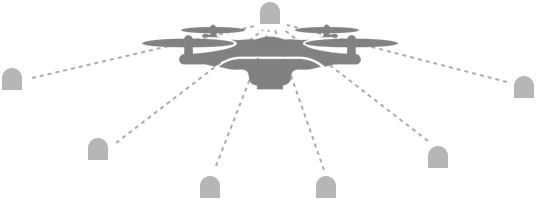
A number of commercial drones, meant for non-businessusage, have very limited range of communication. They oftentalk to the remote controller over WiFi channels.
For this, drones need to have an in-built WiFi modulethat can connect with other WiFi enabled devices toreceive commands for control.


Hello!??
Can’t hear you..
Given the battery constraints, however, the drone’s WiFimodule lacks significant range. As a result, you have twooptions if you want your drone to go afar:

Walk with the drone
This simple solution becomes challenging since it’s difficult to keep up with thespeed of the drone, while managing the controls like pitch and yaw of the drone.As a result, your attention gets distributed and you focus more on controllingand keeping up with the drone, instead of having fun with it.

Setup WiFi beacons
You plan the drone path ahead of time, and setup WiFi beacons so that they canact as communication relay for your drone. This method is extremely expensive,not to mention tedious and highly constrained.


Imagine setting up beacons everytimeyou want to fly the drone! It kinda takesthe fun out of it. And unless you’re adeptat dealing with wifi beacons and othersimilar devices, it may be really difficultfor you
CONSTRAINED
Every time you want to fly the drone tolarger distances, you have to know thearea at least, if not the path. Further, notall terrains will be suitable to setup theWiFi beacons
TEDIOUS
CONSTRAINED
Every time you want to fly the drone to larger distances, you have to know the area at least, if not the path. Further, not all terrains will be suitable to setup the WiFi beacons
Imagine setting up beacons everytime you want to fly the drone! It kinda takes the fun out of it. And unless you’re adept at dealing with wifi beacons and other similar devices, it may be really difficult for you
TEDIOUS
So what if..






In this problem, there are two areas where we could intervene:
Enhancing the WiFi reception of the drone.This is difficult given the proprietary natureof the device we were working with.
Replace the need of WiFi beacon withsomething more ubiquitous.
In this problem, there are two areas where we could intervene:
Enhancing the WiFi reception of the drone. This is difficult given the proprietary nature of the device we were working with.
Replace the need of WiFi beacon with something more ubiquitous.
Behind The Curtains
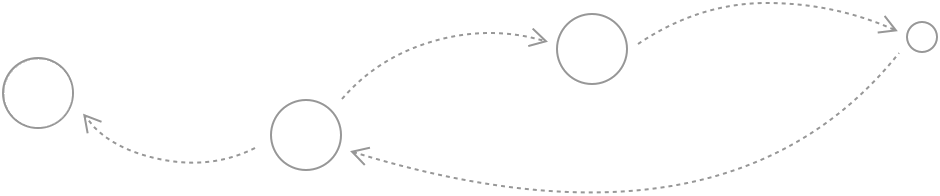
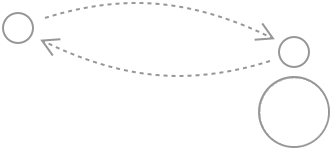
Our team created a small controller, that could be mounted on the drone itself. People could use their mobileinternet to talk to and give commands to this auxiliary controller, which then translated and passed them to thedrone. This is a highly simplified way of explaining the whole architecture we developed.
GPS
Microsoft Azure
IoT Hub
GSM
WiFi
WiFi
Mounted
controller
Mobile
phone
Server
Drone
Our team created a small controller, that could be mounted on the drone itself. People could use their mobile internet to talk to and give commands to this auxiliary controller, which then translated and passed them to the drone. This is a highly simplified way of explaining the whole architecture we developed.




We used AR Parrot Drone 2.0 for our design, development and testing. Due to the proprietary nature of the drone, itwas difficult to directly interface with the drone. So we designed an auxiliary controller that could be mounted on thedrone. Our mobile interface communicated with the auxiliary controller, which in turn communicated with the drone.
The auxiliary controller had the following components:
A GPS sensor
A WiFi module
A GSM module
Raspberry Pi 2(Running Windows 10 IoT):For providing a framework to
run all the other modules.
To get the location of the
drone for control
To communicate with
the drone
To provide the ‘mobile-data’communication channel, formobile interface to talk toauxiliary controller
We used AR Parrot Drone 2.0 for our design, development and testing. Due to the proprietary nature of the drone, it was difficult to directly interface with the drone. So we designed an auxiliary controller that could be mounted on the drone. Our mobile interface communicated with the auxiliary controller, which in turn communicated with the drone.
The auxiliary controller had the following components:
-
A GPS sensor
To get the location of the drone for control
-
A WiFi module
To communicate with the drone
-
A GSM module
To provide the ‘mobile-data’ communication channel, for mobile interface to talk to auxiliary controller
-
Raspberry Pi 2
(Running Windows 10 IoT): For providing a framework to run all the other modules.



We also developed a mobile application to demonstrate the end-to-endflow of controlling the drone through mobile interface as well. This was aUWP (Universal Windows Platform) application, that we customised formobile interface.
Mobile
phone
Server
GPS
WiFi
GSM
Our mobile application communicated the controls and directions to theauxiliary controller (mounted on the drone) through Microsoft Azure IoT Hub(?) over mobile data. For speed and performance, we used LTE (or 4G mobiledata) to communicate to the mounted controller, which interfaced with andcontrolled the drone.
Mounted
controller
Microsoft Azure
IoT Hub
We also developed a mobile application to demonstrate the end-to-end flow of controlling the drone through mobile interface as well. This was a UWP (Universal Windows Platform) application, that we customised for mobile interface.
Our mobile application communicated the controls and directions to the auxiliary controller (mounted on the drone) through Microsoft Azure IoT Hub (?) over mobile data. For speed and performance, we used LTE (or 4G mobile data) to communicate to the mounted controller, which interfaced with and controlled the drone.
Challenges

This project was envisioned particularly around providing people the ability to live-stream events at theirconvenience. Given the numerous technical challenges and high-level nature of the problem, it had to be brokendown into simpler, more low-level problems, out of which, we chose the problem of restriction on communicationrange to work on.
We also faced some issues around the lag in communication with the drone. Forinstance, in the starting, it took the drone ~ 5 sec to receive a command andexecute it. For this, we had to redesign our architecture and re-structure thecomponents that we were using. We were able to bring the performance downto < 1 second.
> 5 sec
< 1 sec

We also aimed to provide more ‘intelligence’ to the drone, by building thecapabilities of obstacle detection and avoidance. We designed the system intheory, however, due to some constraints on time and resources, it couldn’t bematerialized completely.